Admin Guide
Webhook Health
Registration and monitoring.
Shopify tells the backend about orders, products, inventory, customers, and collections through webhooks. The Webhooks page keeps those subscriptions healthy. (Admin role to view; Super Admin to change.)
What healthy looks like
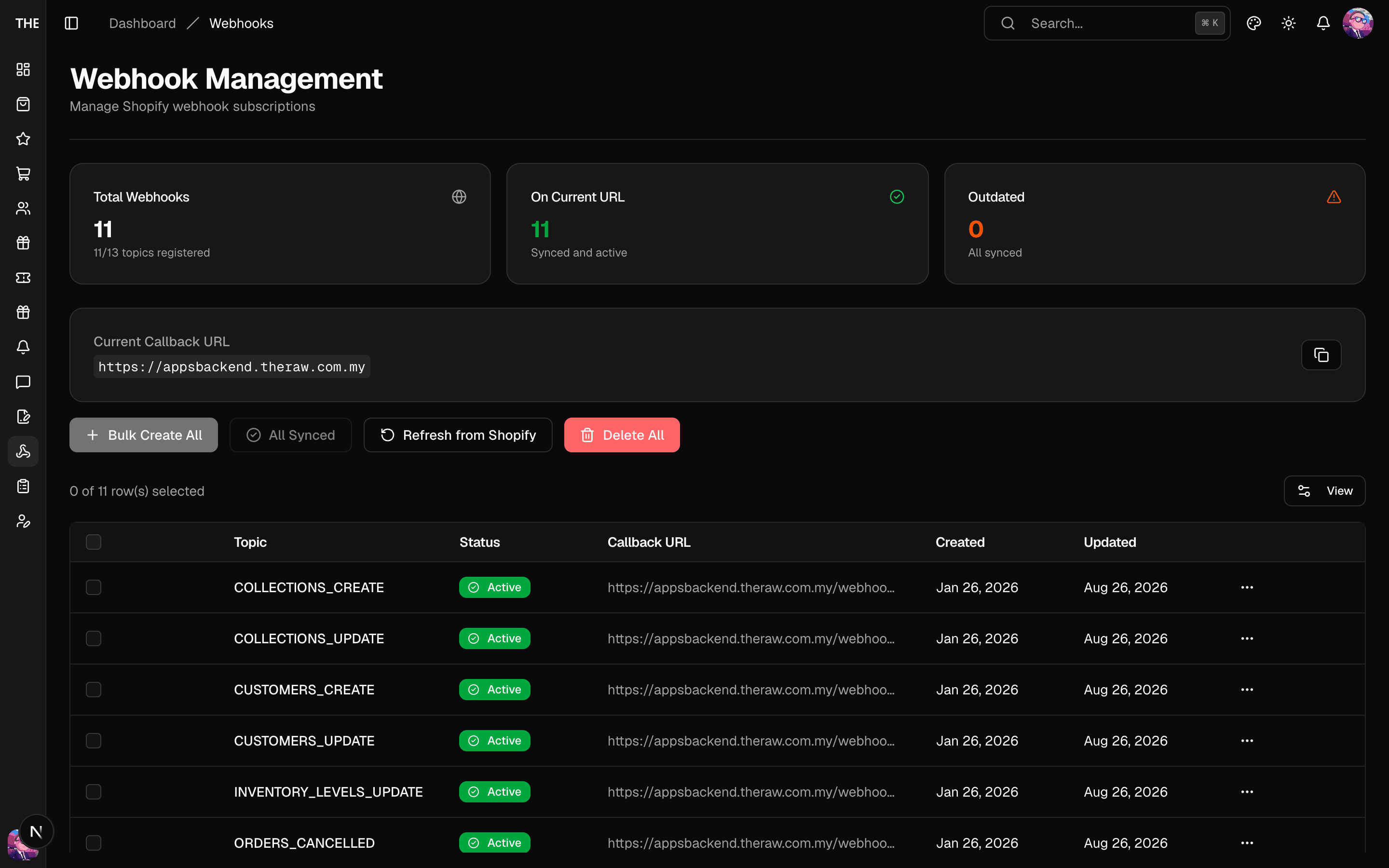
- All required topics registered (the stats card shows coverage vs required and any missing topics).
- Every callback URL pointing at the current deployment (the "current base URL" card). After any backend deploy that changes the URL, use Sync URLs.
- Status badges green;
outdated= URL points somewhere else;error= Shopify reported delivery failures.
Workflow
- Fresh deployment or missing topics → Bulk Create All registers everything (deploy the backend before this — registrations to a dead route get dropped by Shopify).
- After a deployment URL change → Sync URLs.
- One bad webhook → Edit URL on its row; nuke-and-pave → Delete All + Bulk Create All ⚠️.
Rules of thumb
- Order webhooks feed loyalty. If new orders stop appearing on the Orders page, check this page first, then the backend's webhookEvents dead-letter queue. If orders appear but earn no stamps, read each order's Stamps badge instead (see Troubleshooting).
- Deleting webhooks stops event delivery until re-registered; do it during a quiet window.